DaMaquina CNC
DaMaquina CNC
Home Features Screens Plans FAQ
Subscribe
SKETCHUP PLUGIN · ACM/ACP DOORS
Planar CNC - Portas ACM/ACP

Planar CNC - Portas ACM/ACP

From the door opening to cut ACM panels, without leaving SketchUp

Planar CNC - Portas ACM/ACP designs the ACM-clad pivot door from the wall opening and prepares production: panel flattening, cutting plan and G-code for the router, profiles cut on the bar, quote, assembly manual and labels. Developed by DaMaquina CNC; interface in Portuguese.

Annual subscription · Alfa 7.6 and Alfa 100 lines
Door from the opening
Enter the opening: profiles, tubes, crossbars and braces are calculated.
Flattened panels
Flanges, folds with allowance, trimming and DXF for every ACM part.
Profiles on the right bar
Take-off and cutting plan for 6000 mm bars.
Assembly and labels
Production manual, assembly drawings and QR Code labels.
THE PROBLEM

Drawing the door is fast. Flattening panels and cutting profiles is what takes the day.

In SketchUp the door is ready in minutes. Then comes the part nobody sees: working out every ACM flange and fold with the right allowance, nesting the parts on the sheet, cutting profiles and tubes without wasting bar, marking lock, handle and pivot, and explaining the assembly to the shop.

Every calculation done by hand is a chance for error, and the error only shows up on the bench: a short flange, a misplaced hole, an extra bar. Planar CNC - Portas does that step straight from the model, with the rules of each profile line built in.

FEATURES

Everything an ACM door needs, inside SketchUp

Every tool works on the same door: what you change in the design reaches the panels, the G-code, the bar cutting, the quote and the assembly manual.

DOOR
Parametric pivot door
Enter the opening and clearances: leaf profiles, tubes, crossbars and 45° braces are calculated, with the crossbars divided by door size.
LINES
Alfa 7.6 and Alfa 100 lines
Profiles and tubes of each line, with their own cutting and assembly rules.
HANDLES
Bar handle and recessed handle
Bar handle up to 3 metres, or a sloped or flat-bottom recessed handle on the lock side, with its parts flattened.
LOCK
Lock and pivot
Lock mortise and drilling, with hub and cylinder, a 1:1 template and the pivot positions.
PANELS
ACM panel flattening
Every part opened with flanges, folds with the per-fold allowance and trimming, on 1500 × 5000 or 1220 × 5000 mm sheets.
CNC
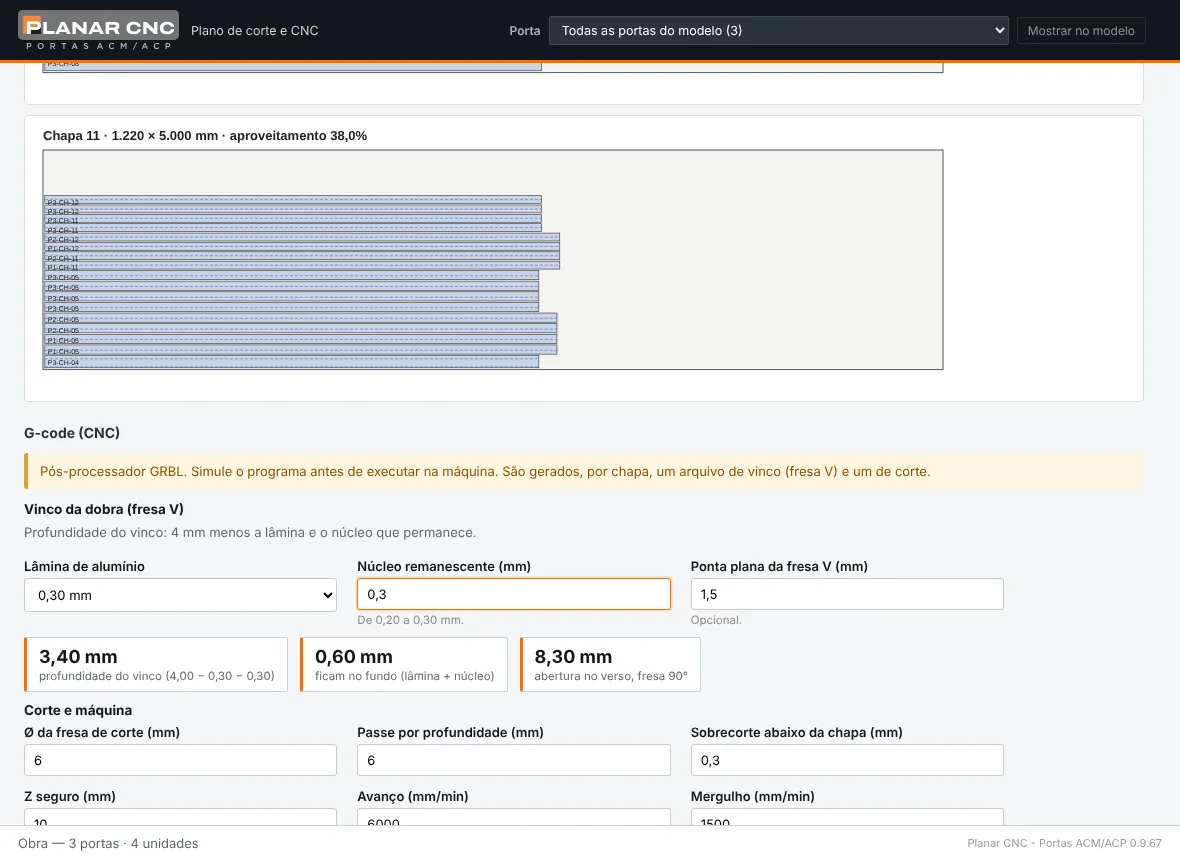
Cutting plan, DXF and G-code
Parts nested on the sheets, DXF per part and G-code for V-groove folding and cutting, sheet by sheet.
COLOURS
ACM colours by manufacturer
Supplier colour catalogues, with wood and brushed grain along the sheet length.
PROFILES
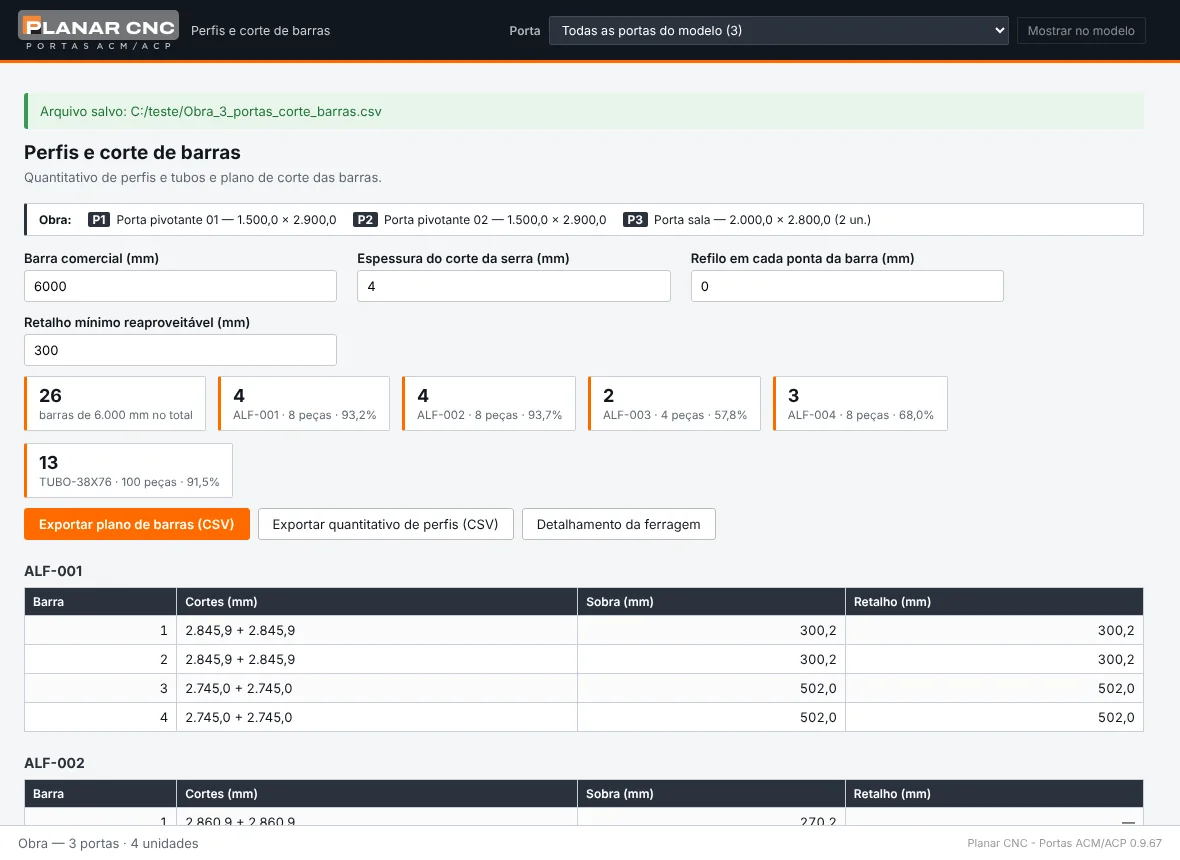
Profiles and bar cutting
Profile and tube take-off and bar cutting plan, with saw kerf and offcuts.
PRODUCTION
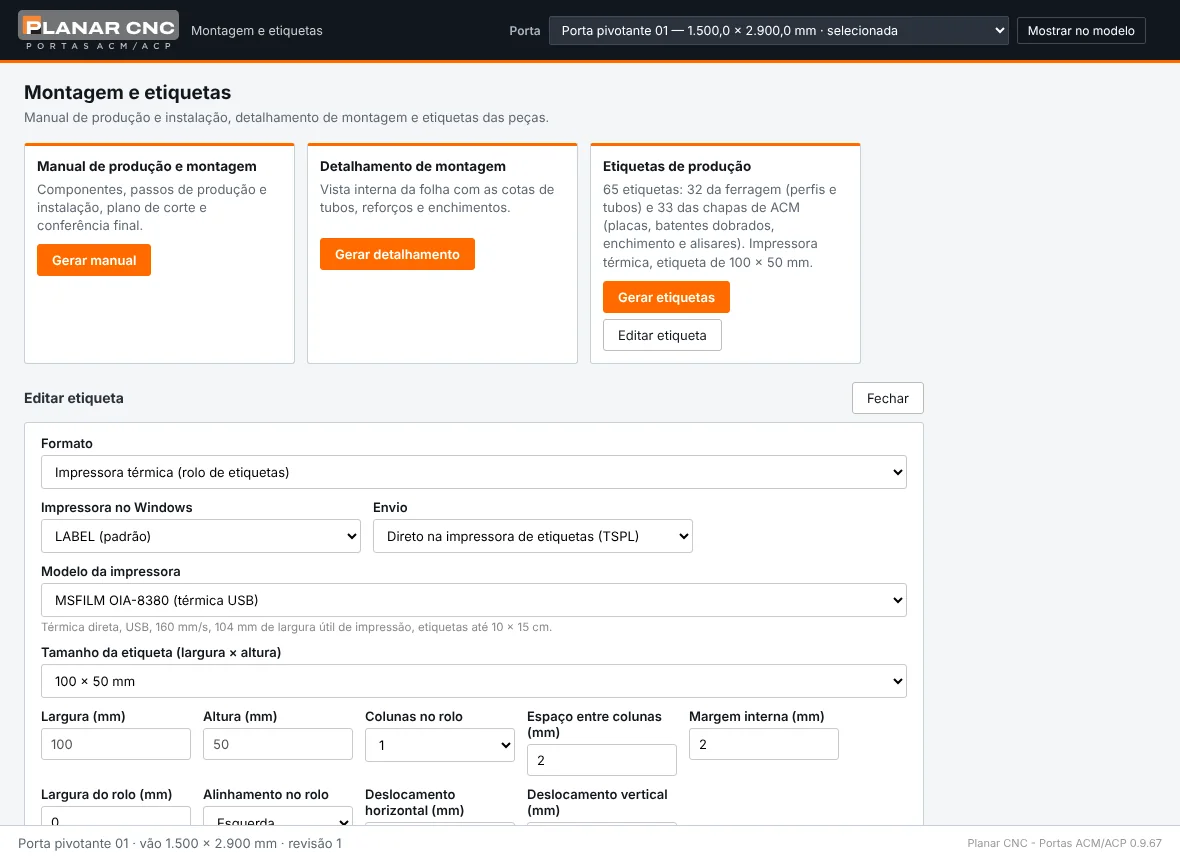
Quote, manual and labels
Quote for the door or the whole job, production and assembly manual, assembly drawings and QR Code labels for thermal printers.
SCREENS

One window for each step of the door

Real screens of Planar CNC - Portas ACM/ACP with an Alfa 7.6 pivot door (interface in Portuguese).
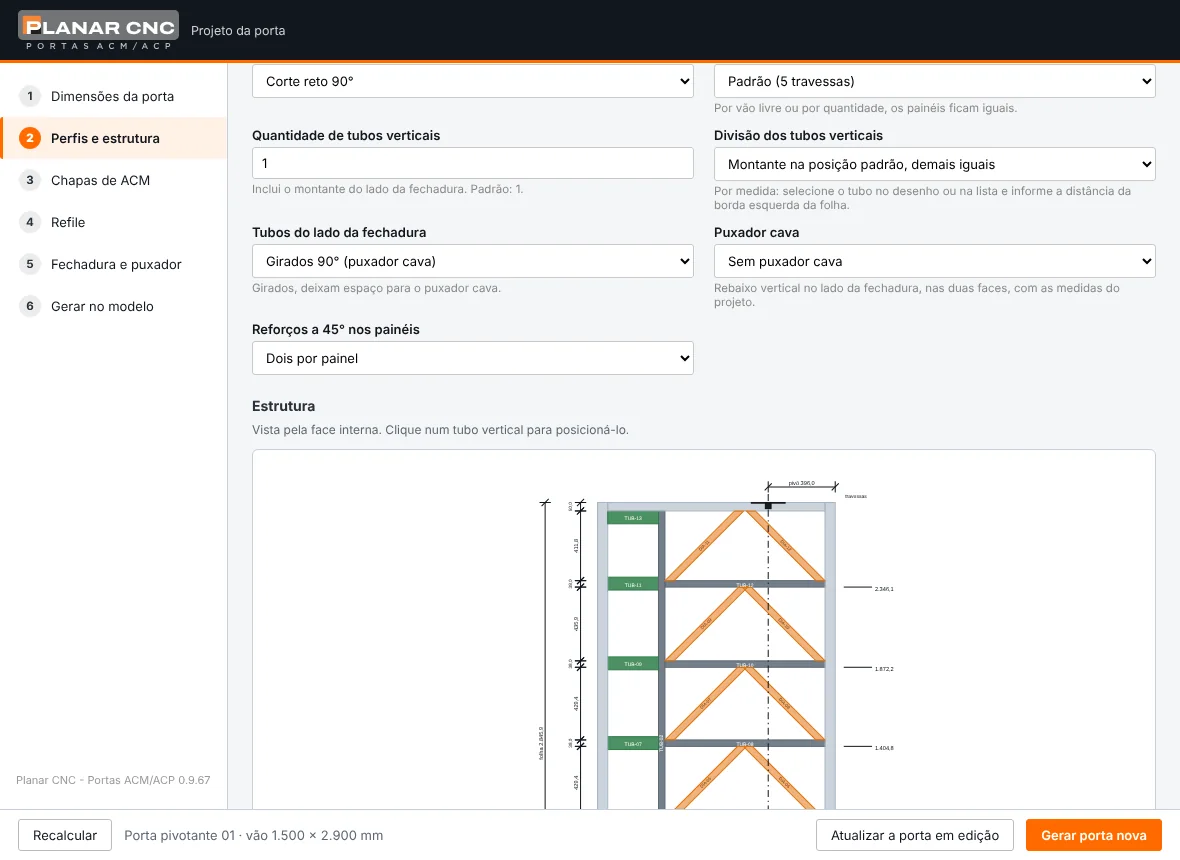
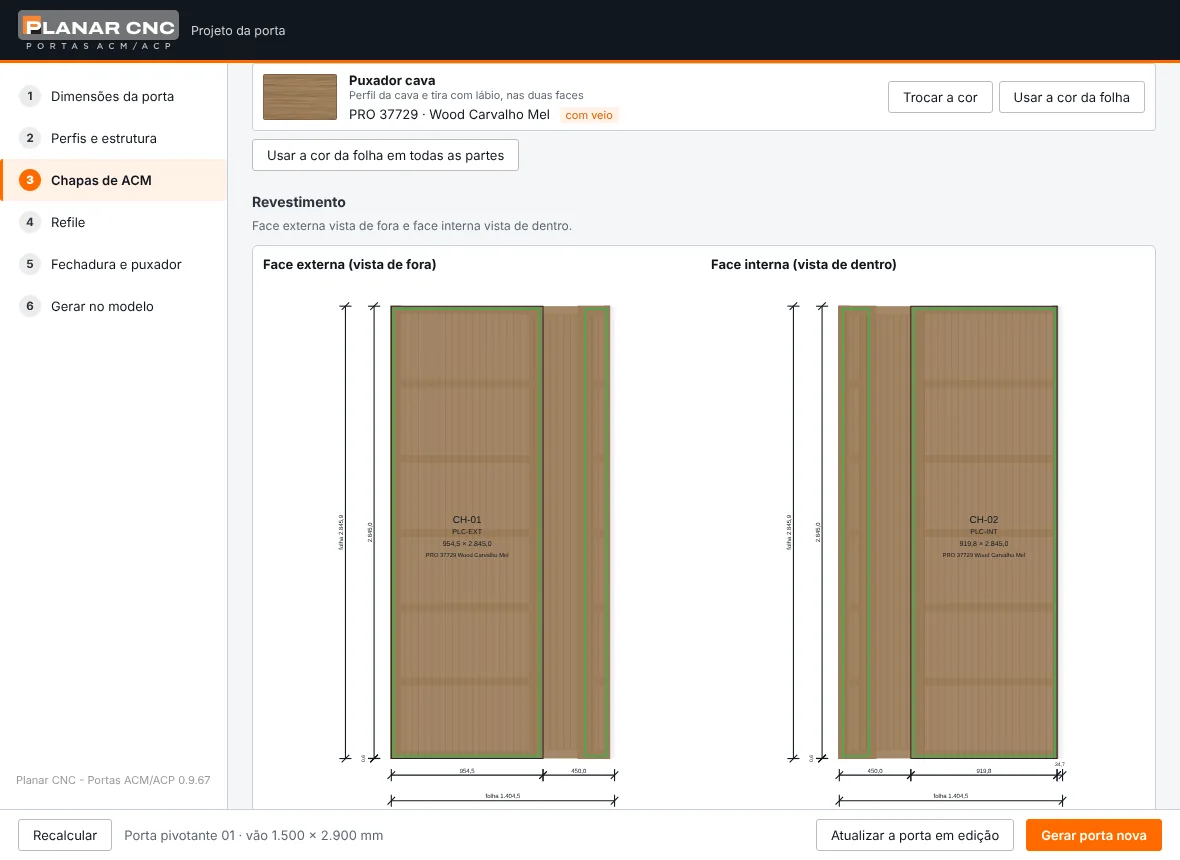
Door design - Planar CNC - Portas ACM/ACP
Door design
Frame with tubes, crossbars and 45° braces.
ACM panels and colours - Planar CNC - Portas ACM/ACP
ACM panels and colours
Both faces clad in the colour chosen from the catalogue.
Panel flattening - Planar CNC - Portas ACM/ACP
Panel flattening
Every part opened, with flanges, folds and trimming.
Cutting plan and CNC - Planar CNC - Portas ACM/ACP
Cutting plan and CNC
Parts on the sheets and G-code for folding and cutting.
Profiles and bar cutting - Planar CNC - Portas ACM/ACP
Profiles and bar cutting
Bars for each profile, cuts and offcuts.
Assembly and labels - Planar CNC - Portas ACM/ACP
Assembly and labels
Production manual, assembly drawings and labels.
HOW IT WORKS

From the opening to the labelled part

01
Enter the opening
Opening width and height, profile line and clearances.
02
Build the door
Frame, cladding, ACM colours, lock and handle.
03
Generate in the model
The door goes into SketchUp with frame and trims and opens at 35°, 60°, 90° and 120°.
04
Send to production
DXF, G-code, bar plan, assembly manual and labels.
LICENSE

Same account as Planar CNC

One account, two tools
Portas uses the same login as Planar CNC - Marcenaria, with its own license. Both run together in the same SketchUp.
Activation in SketchUp
Sign in with the account e-mail and password and the license is activated on the computer, checked over the internet.
Made in Brazil
Developed and maintained by DaMaquina CNC, with WhatsApp support.
PLANS

Annual subscription

Talk to our team for pricing, to release your license and to install Planar CNC - Portas ACM/ACP.

Planar Portas
AVAILABLE
Annual subscription
pricing on request
  • ✓Parametric pivot door, Alfa 7.6 and Alfa 100 lines
  • ✓Bar handle, recessed handle, lock and pivot
  • ✓ACM panel flattening and DXF
  • ✓Cutting plan and G-code for folding and cutting
  • ✓ACM colours by manufacturer
  • ✓Profiles and bar cutting plan
  • ✓Quote for the door or the whole job
  • ✓Assembly manual and QR Code labels
Subscribe →
ALSO AVAILABLE
Planar CNC - Marcenaria

Library of 331 parametric furniture models, optimised cutting plan, layered DXF for CNC, assembly manual and labels.

See Marcenaria →
REQUIREMENTS SketchUp Pro or Studio 2025 on Windows and an internet connection while in use. SketchUp Go, which runs in the browser, does not accept extensions.
FAQ

Frequently asked questions

Do I need internet to use it?
Yes. Planar CNC - Portas checks the license with the server when SketchUp opens and every 10 minutes. If the connection drops while you work, it keeps running until you close SketchUp.
Which SketchUp does it work with?
SketchUp Pro or Studio 2025 on Windows. SketchUp Go, which runs in the browser, does not accept extensions.
Can I use it together with Planar CNC - Marcenaria?
Yes. Both use the same account and run together in the same SketchUp, each with its own license.
Which profile lines does it support?
The Alfa 7.6 and Alfa 100 lines, for ACM/ACP-clad pivot doors.
Which ACM sheets does it use?
4 mm ACM, on 1500 × 5000 mm or 1220 × 5000 mm sheets, with the suppliers’ colour catalogues.
Can I share my login?
No. The license is personal: the same login on more computers at the same time blocks the account, as set out in the license agreement.
PLANAR CNC

I want to subscribe to Planar CNC - Portas

Fill in your details. Our team will activate your license and help with the installation.

Planar CNC - Portas ACM/ACP
Request a subscription
Reply within 1 business day. Your data is safe.
DaMaquina CNC
Subscribe →
DaMaquina CNC
Home Features Screens Plans FAQ
Subscribe
SKETCHUP PLUGIN · ACM/ACP DOORS
Planar CNC - Portas ACM/ACP

Planar CNC - Portas ACM/ACP

From the door opening to cut ACM panels, without leaving SketchUp

Planar CNC - Portas ACM/ACP designs the ACM-clad pivot door from the wall opening and prepares production: panel flattening, cutting plan and G-code for the router, profiles cut on the bar, quote, assembly manual and labels. Developed by DaMaquina CNC; interface in Portuguese.

Annual subscription · Alfa 7.6 and Alfa 100 lines
See the plans → What it does
{{ v.title }}
{{ v.desc }}
THE PROBLEM

Drawing the door is fast. Flattening panels and cutting profiles is what takes the day.

In SketchUp the door is ready in minutes. Then comes the part nobody sees: working out every ACM flange and fold with the right allowance, nesting the parts on the sheet, cutting profiles and tubes without wasting bar, marking lock, handle and pivot, and explaining the assembly to the shop.

Every calculation done by hand is a chance for error, and the error only shows up on the bench: a short flange, a misplaced hole, an extra bar. Planar CNC - Portas does that step straight from the model, with the rules of each profile line built in.

FEATURES

Everything an ACM door needs, inside SketchUp

Every tool works on the same door: what you change in the design reaches the panels, the G-code, the bar cutting, the quote and the assembly manual.

{{ r.label }}
{{ r.titulo }}
{{ r.desc }}
SCREENS

One window for each step of the door

Real screens of Planar CNC - Portas ACM/ACP with an Alfa 7.6 pivot door (interface in Portuguese).
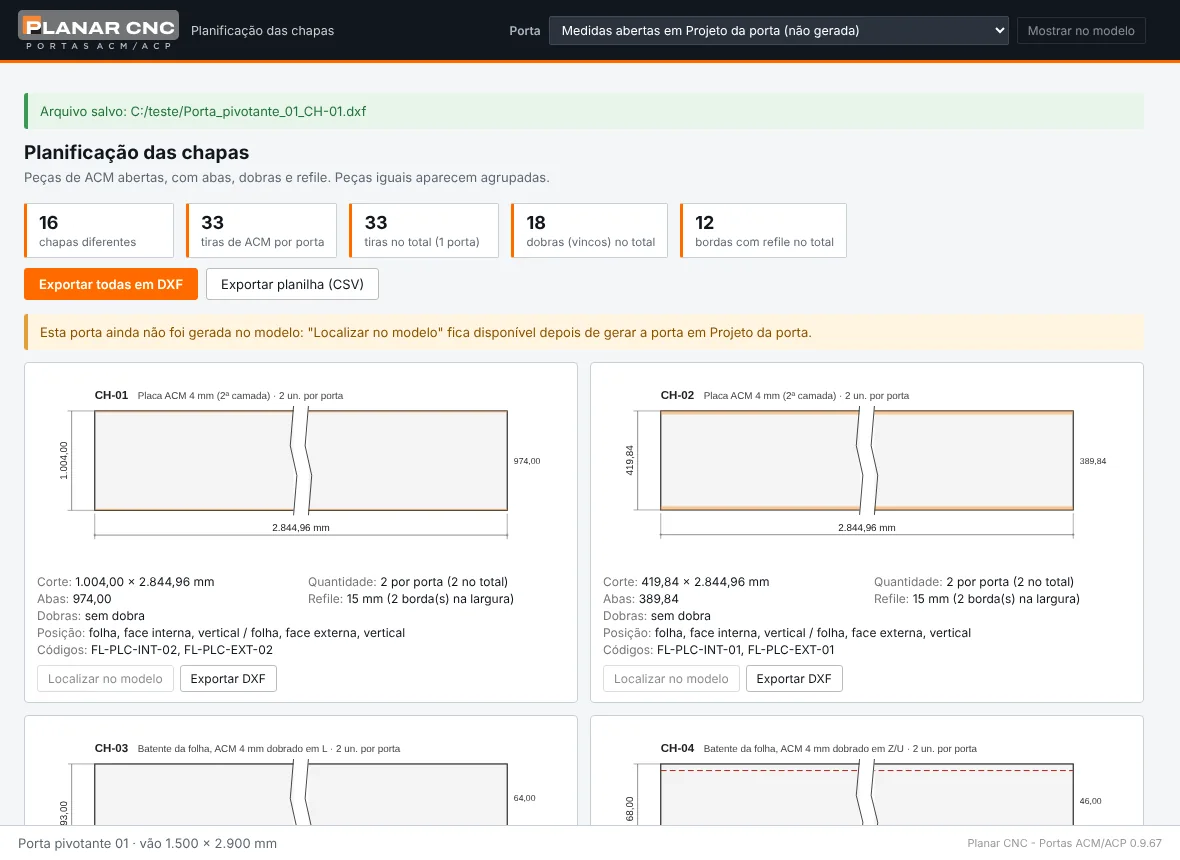
{{ m.alt }}
{{ m.titulo }}
{{ m.desc }}
HOW IT WORKS

From the opening to the labelled part

{{ p.n }}
{{ p.titulo }}
{{ p.desc }}
LICENSE

Same account as Planar CNC

{{ s.titulo }}
{{ s.desc }}
PLANS

Annual subscription

Talk to our team for pricing, to release your license and to install Planar CNC - Portas ACM/ACP.

Planar Portas
AVAILABLE
Annual subscription
pricing on request
  • ✓Parametric pivot door, Alfa 7.6 and Alfa 100 lines
  • ✓Bar handle, recessed handle, lock and pivot
  • ✓ACM panel flattening and DXF
  • ✓Cutting plan and G-code for folding and cutting
  • ✓ACM colours by manufacturer
  • ✓Profiles and bar cutting plan
  • ✓Quote for the door or the whole job
  • ✓Assembly manual and QR Code labels
Subscribe →
ALSO AVAILABLE
Planar CNC - Marcenaria

Library of 331 parametric furniture models, optimised cutting plan, layered DXF for CNC, assembly manual and labels.

See Marcenaria →
REQUIREMENTS SketchUp Pro or Studio 2025 on Windows and an internet connection while in use. SketchUp Go, which runs in the browser, does not accept extensions.
FAQ

Frequently asked questions

{{ f.q }}
{{ f.a }}
PLANAR CNC

I want to subscribe to Planar CNC - Portas

Fill in your details. Our team will activate your license and help with the installation.

Planar CNC - Portas ACM/ACP
Request a subscription
Reply within 1 business day. Your data is safe.